被破解了!所有Win11掌机都能用上全屏Xbox:不再是XBOX掌机专属

快科技
Nov 14, 2025

快科技11月14日消息,微软近期与ROG合作推出Xbox游戏掌机,其最大的独家卖点之一就是内置了Xbox全屏游戏界面。

该界面针对游戏手柄操作进行了深度优化,不过如今有技术高手找到了破解方法,可以让任何运行Windows 11的掌机,都可以启用这个独占的Xbox界面。
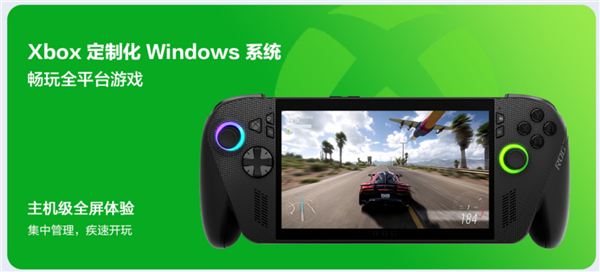
8bit2qubit透露,这个酷炫的Xbox界面并非为特定设备单独开发,而是一直存在于Windows 11系统当中,只是被微软隐藏起来。

其编写了一个名为“Xbox Full Screen Experience Tool”的工具,可以强制启动这个被隐藏的界面。这不仅适用于掌机,连普通的笔记本电脑和台式机也能一键变身为Xbox游戏机。

想要体验这一Xbox全屏界面,用户需要满足系统版本要求,即必须使用Windows 11 24H2或25H2版本,且版本号至少为26100.7019或更高:

前往GitHub下载Xbox Full Screen Experience Tool

打开工具后,选择Recommended Default选项

点击Enable Xbox Full Screen Experience按钮并重新启动电脑

重启后,前往Microsoft Store检查并下载所有可用更新,尤其是与游戏相关的组件

最后,进入“设置 -> 游戏 -> 全屏体验”,在“选择主应用程序”菜单中选择“Xbox”,并启用“启动时进入全屏幕体验”选项,再次重新启动。

完成以上步骤后,Windows 11游戏掌机每次启动都将自动进入优化过的全屏Xbox界面。
Disclaimer: Investing carries risk. This is not financial advice. The above content should not be regarded as an offer, recommendation, or solicitation on acquiring or disposing of any financial products, any associated discussions, comments, or posts by author or other users should not be considered as such either. It is solely for general information purpose only, which does not consider your own investment objectives, financial situations or needs. TTM assumes no responsibility or warranty for the accuracy and completeness of the information, investors should do their own research and may seek professional advice before investing.

Most Discussed

  1. 1


  2. 2


  3. 3


  4. 4


  5. 5


  6. 6


  7. 7


  8. 8


  9. 9


  10. 10