


Have you ever watched US stock prices climb overnight, only to miss out because your order didn't go through? Or have you set a price too high, hesitated, or set it too low and failed to execute?
It’s frustrating, especially when you miss buying the dip during a sharp drop, only to see the stock rebound while you're asleep.
Key takeaways
Why orders matter for Aussies: For Australian investors, using specific order types is essential for managing trades in US markets that are open while you're asleep.
Price vs Speed: The most basic choice is between a Limit Order, which lets you control the price you pay, and a Market Order, which guarantees speed of execution (but not the price).
Automate your risk management: Orders like Stop-Loss, Stop-Limit, and Trailing Stop are critical tools that automatically execute to protect your profits or limit potential losses, even when you're offline.
Advanced control: The Tiger Trade app offers advanced orders, such as "Attached Orders" and "One-Cancels-All (OCA)", which let you set your complete entry and exit strategy in a single step.
Why understanding US Stock order types matters for Aussie investors
Trading US markets from Australia presents a unique challenge: the time difference. The NYSE and NASDAQ regular trading hours often happen while most of Australia is asleep.
This is why understanding stock order types is essential for a smart trading strategy. By using the right orders, you can set your entry and exit points in advance, manage risk, and let the platform execute your plan for you, even when you're offline.
The good news?
With Tiger Trade’s versatile order types, you can navigate these market fluctuations with ease. Whether you are aiming for efficiency or precision, these tools help you trade smarter and stay in control.
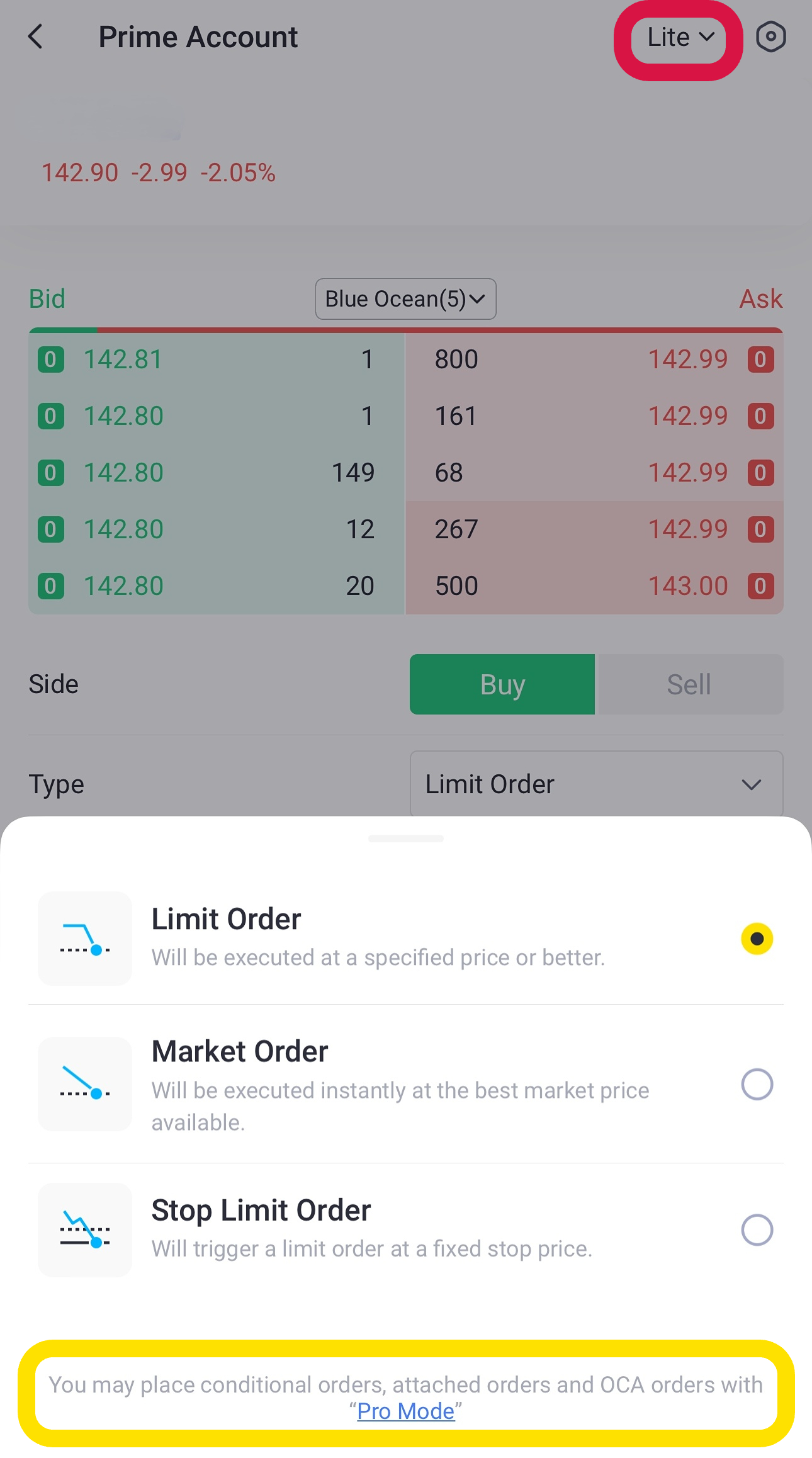
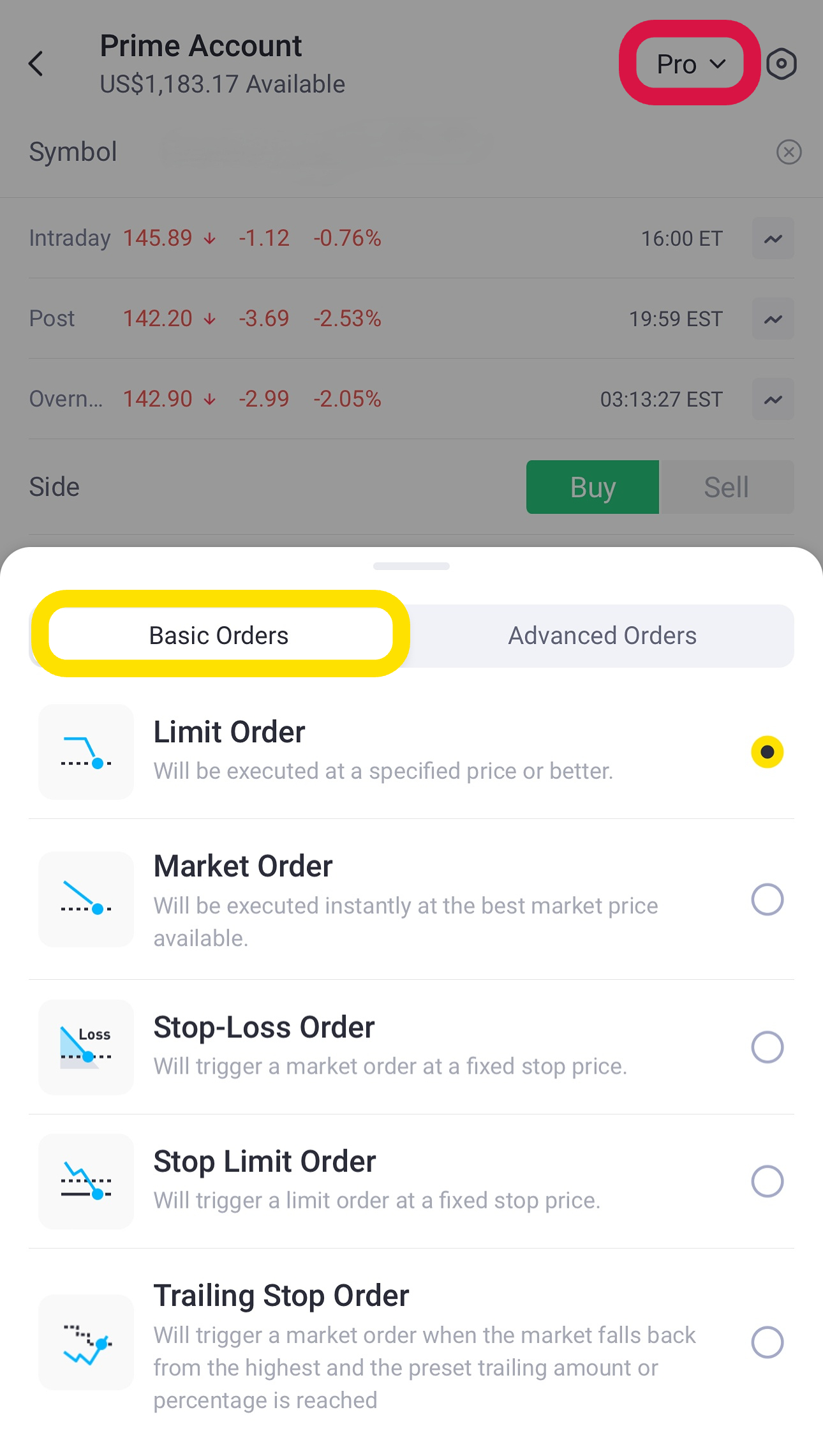
In the Tiger Trade app, you can switch between "Lite" mode for basic orders and "Pro" mode for a full suite of advanced trading tools.
Market order vs limit order: The core difference
For most day-to-day trading, your choice will come down to two basic types. The difference between a market order vs limit order is simple:
Feature | Market Order | Limit Order |
Priority | Speed of execution | Price control |
Execution | Immediately at the best available current market price | Only at your specified "limit price" or better |
Guarantees | Guaranteed Execution (your trade will fill) | Guaranteed Price (you get your desired price or better) |
Risk of Price | Slippage possible: Actual fill price may differ from quoted price, especially in volatile markets | No Slippage beyond your limit price. Risk of Non-Execution (order may not fill if price isn't met) |
Best Use Case | When you want to buy/sell immediately, believing the current price is acceptable (e.g., fast-moving news event). | When you have a specific price in mind and are willing to wait for it (e.g., buying a dip, selling at a target). |
Active Hours | Typically only during regular trading hours (e.g., 9:30 AM - 4:00 PM ET) | Can often be set for 24-hour trading or extended hours on platforms like Tiger Trade. |
Let's break down the basic order types every Aussie investor should know.
Basic stock order types for every investor
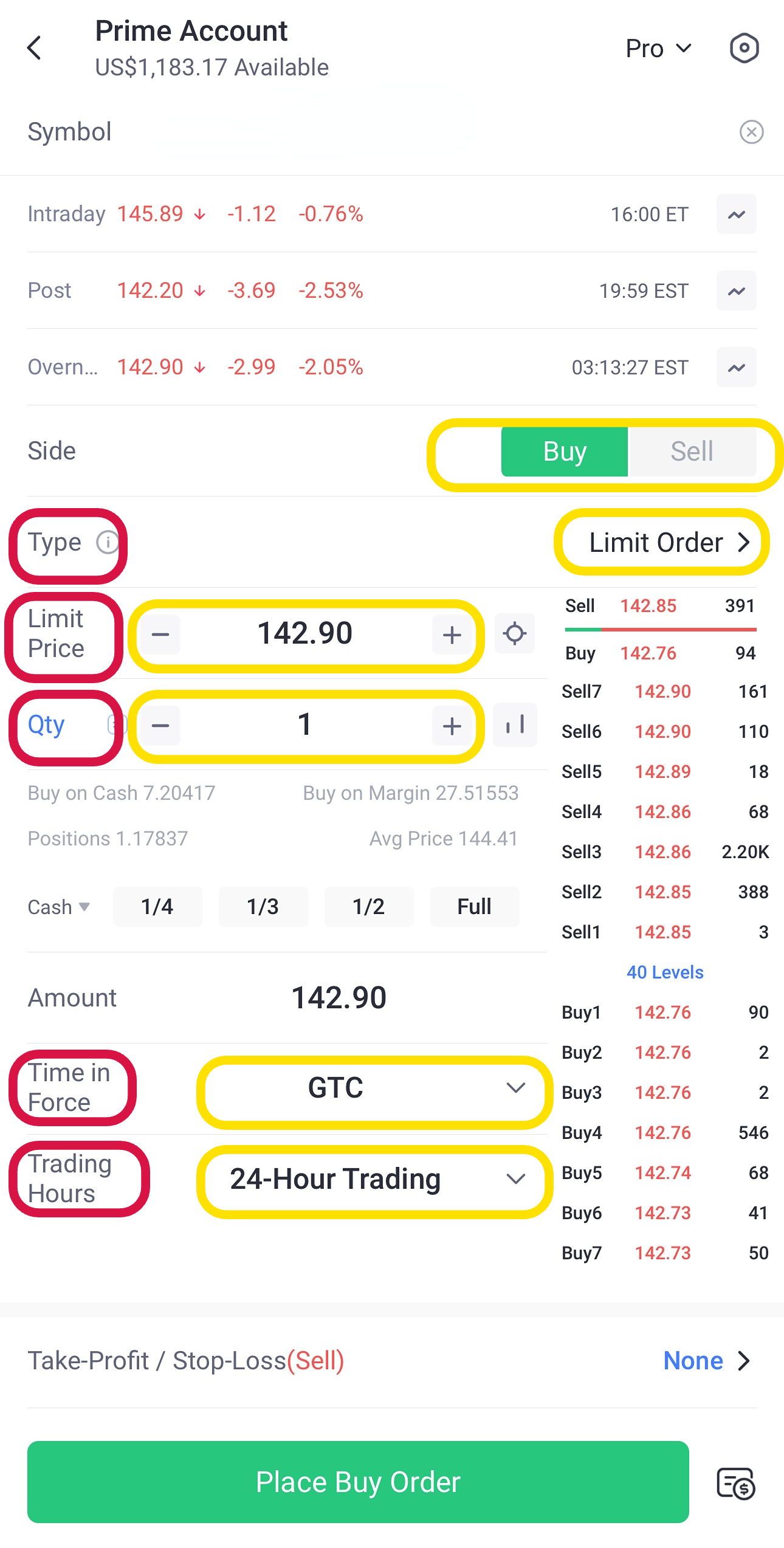
1. Limit Order (controlling your price)
A limit order is an order to buy or sell a stock at a specific price or better. It lets you decide the ideal price you’re willing to pay or accept. The specific price you set is called the "limit price".
When to use It
Buying: You're watching Apple (AAPL), currently at $190, but you only want to buy if it drops to $180. You set a buy limit order at $180. Your order will only fill if the price hits $180 and a seller matches your bid.
Selling: You own AAPL and want to sell, but only if the price rises to $200. You set a sell limit order at $200.
Benefit: With Tiger Trade, you can place limit orders for over 9,500 US stocks with 24-hour trading availability, allowing you to set your orders during the Australian day.
The catch: For highly volatile stocks, setting an overly optimistic price (too low for a buy, too high for a sell) might result in your order never being filled.
How to place it
Go to the stock’s order page.
Select "Limit Order."
Set your "Limit Price."
Input the "Qty" (quantity).
Choose "Time in Force" (e.g., GTC - Good 'Til Cancelled).
Select "Trading Hours" (e.g., 24-Hour Trading).
Place the order.
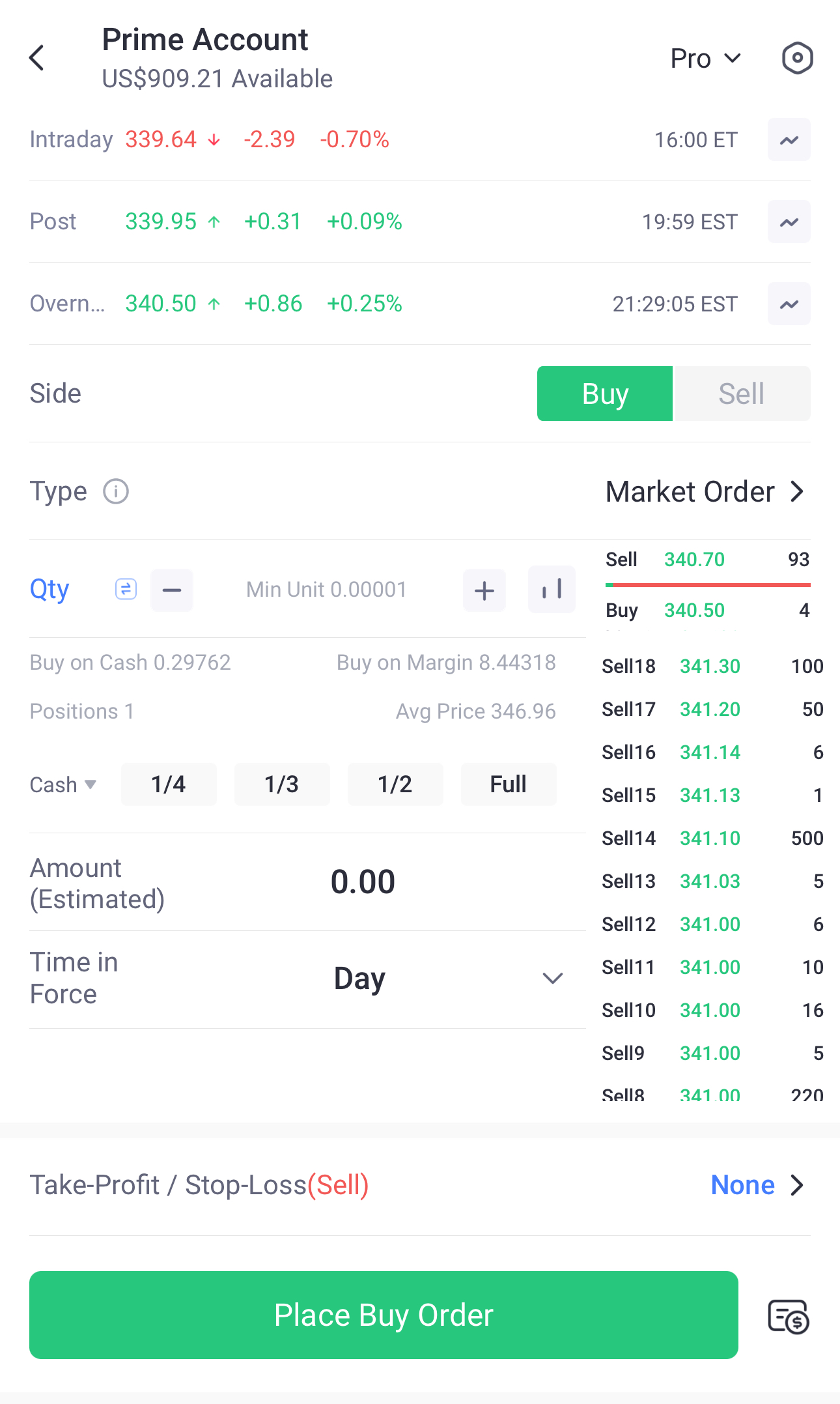
2. Market Order (prioritising speed)
A market order prioritises speed over price. It executes your trade instantly at the best available market price.
When to use it
Example: Tesla (TSLA) has just released exciting news, and the stock is skyrocketing. You don't want to miss the move by haggling over a few cents—you want to buy in now. A market order gets you into the position without delay.
Warning: Market orders come with trade-offs. In volatile markets, the price you get might be different from the price you saw a second ago. This is called "slippage."
Important: Market orders are typically only valid during regular trading hours (e.g., 9:30 AM - 4:00 PM ET). This restriction protects you, as low liquidity outside of regular hours can lead to very unfavourable prices.
Using order types for risk management
These orders are your primary tools for protecting your capital and locking in profits.
3. Stop-Loss Order (your defensive safety net)
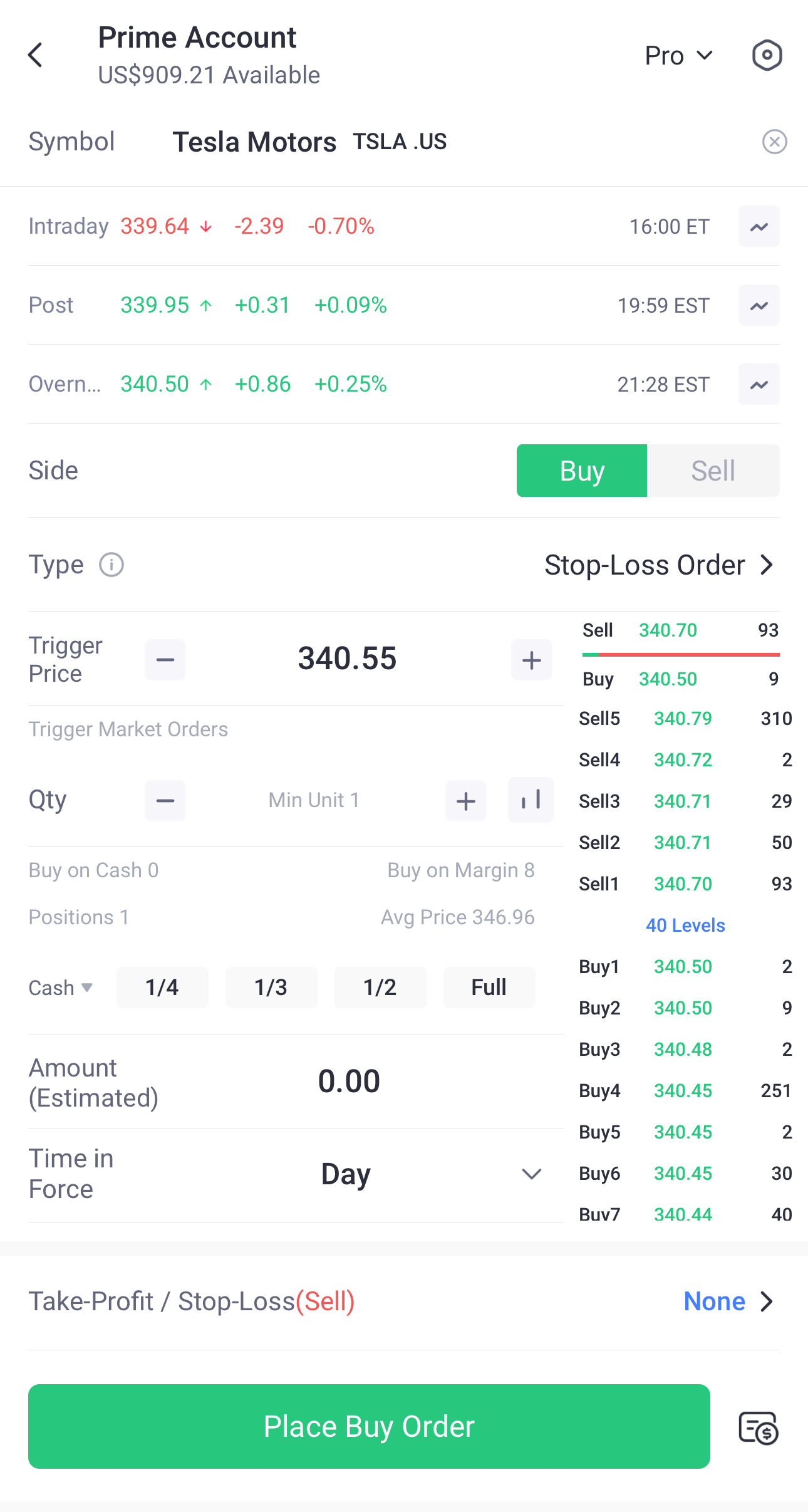
A stop-loss order is a defensive tool that helps you limit potential losses. You set a "trigger price." If the stock falls to that price, it automatically triggers a market order to sell your shares. This is the most common type of stop sell order.
When to use it
Limiting losses: You buy NVIDIA (NVDA) for $430, but you want to protect yourself from a major drop. You set a stop-loss order at $400. If the stock falls to $400, your order triggers, and it sells your shares at the next available market price, getting you out before the loss potentially gets worse.
Securing gains: If NVDA climbs to $500, you could move your stop-loss up to $470. This locks in a $40 profit, ensuring a gain even if the stock reverses.
How to place it
Go to the stock’s order page.
Select "Stop-Loss Order."
Set your "Trigger Price."
Input the "Qty" (quantity).
Choose "Time in Force."
Place the order.
4. Stop-Limit Order (adding price control to your stop)
A stop-limit order adds an extra layer of control. It combines a "stop" trigger price with a "limit" price. Once the stop price is hit, it triggers a limit order that will only execute at your limit price or better.
When to use it
Example: You own NVDA at $430. You want to sell if it drops to $400 (your stop price), but you are not willing to accept less than $395 (your limit price) in a flash crash. If the stock falls to $400, your limit order to sell at $395 is activated.
The catch: If the market gaps down past your limit price (e.g., it drops from $401 straight to $394), your order will be triggered but may not execute.
Buy side: You can also use a stop-limit buy order. This is often used to buy a stock after it breaks through a resistance level (e.g., "Buy if the price rises to $450, but don't pay more than $451").
How to place it
Go to the stock’s order page.
Select "Stop Limit Order."
Set your "Stop Price" (the trigger).
Set your "Limit Price" (the price you'll accept).
Input the "Qty" (quantity).
Choose "Time in Force" and "Trading Hours."
Place the order.

5. Trailing Stop Order (the 'smart' stop-loss)
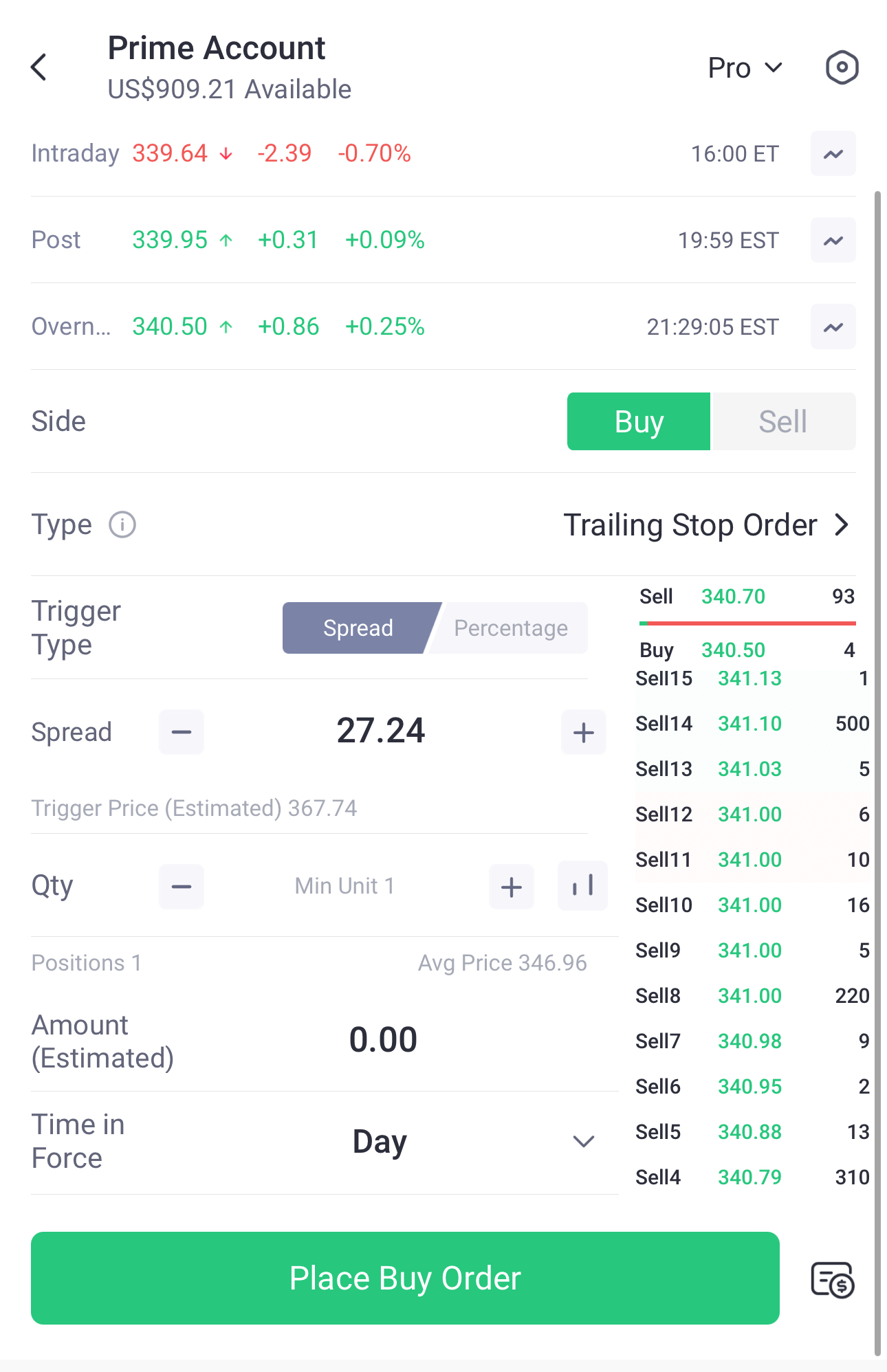
This is a dynamic stop-loss order. Instead of a fixed price, the trigger price adjusts automatically as the stock price moves in your favour. You can set the "trail" as a fixed dollar amount or a percentage.
When to use it
Amount example: You buy a stock at $150 and set a $2 trailing stop. When the stock rises to $160, your stop price automatically moves up to $158. If the stock then falls back to $158, the order triggers a sale, locking in your gains.
Percentage example: You set a 5% trailing stop. If the stock hits $160, your stop is now $152 (5% below $160).
Benefit: This order is excellent for capturing profits in a strong uptrend while still protecting you from a significant reversal.
How to place it
Go to the stock’s order page.
Select "Trailing Stop Order."
Choose your "Trigger Type" (Spread for amount or Percentage).
Set your trail "Spread" or "Percentage."
Input the "Qty" (quantity).
Choose "Time in Force."
Place the order.
Advanced stock order types (Pro Mode)
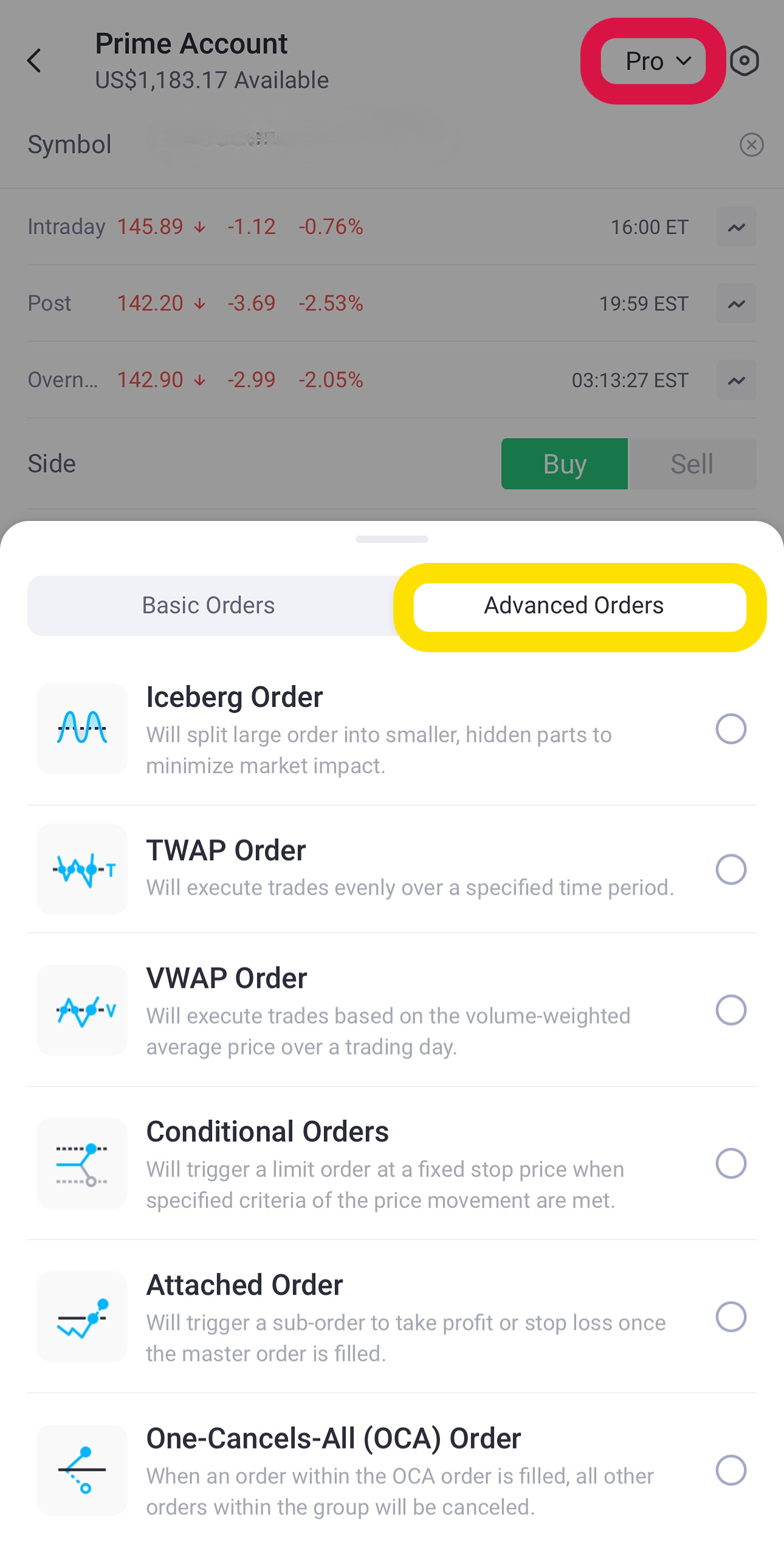
For those who want more control, "Pro Mode" on Tiger Trade unlocks advanced strategies.
Conditional order: This lets you set a trigger (e.g., a stock reaching a price) that will then automatically place a separate market or limit order. For example, "IF TSLA falls to $250, THEN place a buy limit order for 10 shares at $249."
Attached order: This allows you to set your entry order (e.g., a limit order to buy) and attach your exit plan (a take-profit order and/or a stop-loss order) all at once. If the main order executes, the exit orders become active
One-Cancels-All (OCA) Order: An OCA order lets you create a group of two or more orders where the execution of one automatically cancels the others. For example, you own a stock at $100. You can set a take-profit limit order at $120 AND a stop-loss order at $90. Whichever one hits first will execute and automatically cancel the other one.
Frequently asked questions (FAQ) for Aussie investors
Q: What is a 'limit price' exactly?
A limit price is the specific price you set in a limit order. It represents the most you are willing to pay for a buy order, or the minimum price you are willing to accept for a sell order. Your order will only be filled at this price or a better one.
Q: What's the difference between a stop-loss order and a stop sell order?
These terms are often used interchangeably. A stop-loss order is the name of the strategy—a tool to limit your loss. A stop sell order is the specific action you place: an order to sell your stock if it falls to your trigger price.
Q: Can I really trade US stocks 24/7 from Australia?
Yes, Tiger Trade offers 24-hour trading on over 9,500 US stocks. This is a significant advantage for Aussie investors. You can use orders like Limit Orders and Stop-Limit Orders during this 24-hour session. However, some order types (like Market Orders) are only active during regular market hours to protect you from the low liquidity and wider spreads that can occur in overnight sessions.
Get more investment knowledge with Tiger Broker
From the simplicity of limit and market orders to the dynamic flexibility of advanced orders, each order type has its unique strengths. Choosing the right one can greatly enhance your trading efficiency while helping you manage risks and returns more effectively, especially when trading from Australia.
But remember, no trading tool is foolproof. Markets are unpredictable, and even with the best orders, there’s always a chance of slippage or unexecuted trades during volatile conditions. Tools are here to assist, but your trading plan and risk management are what truly matter.
Trade smart and stay informed! Visit our Learn page for more articles on how to use the Tiger Trade app and investor insights.
Disclaims: This content is for information purposes only and does not constitute an offer to sell, buy, recommend or endorse any financial products. We make no representations or warranties regarding the accuracy, truthfulness, or legality of any comments and views shared in the interview. Capital at risk. We do not provide financial advice that considers your personal objectives, financial situations or needs. Past performance is no guarantee of future results. See risk disclosures, PDS, TMD, FSG and T&Cs via our website before trading and seek independent advice if necessary. Tiger Brokers (AU) Pty Limited ABN 12 007 268 386 AFSL 300767.

