[New] Watchlist now supports pinning
[New] Trade History now supports custom date range filtering
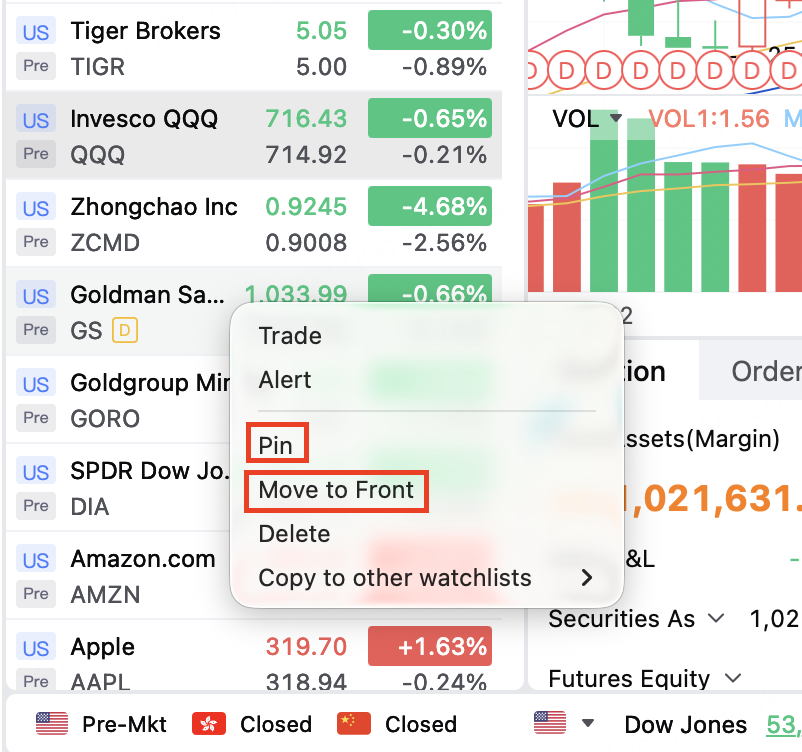
[New] Watchlist now supports pinning
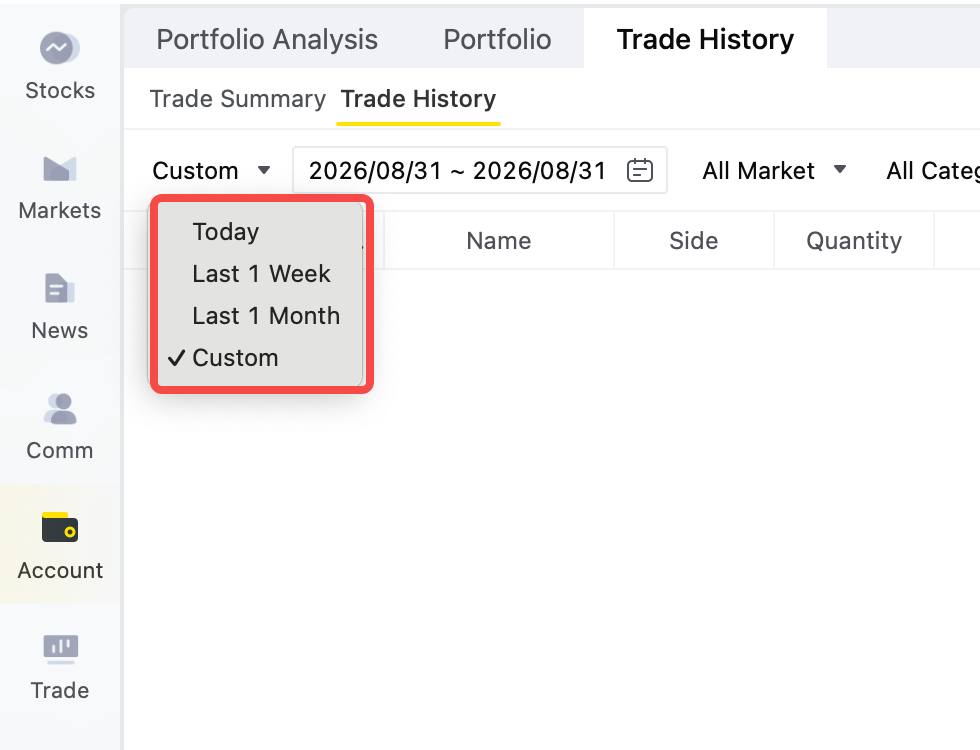
[New] Trade History now supports custom date range filtering
Pin watchlist items via right-click, pin multiple at once, or move them to the top—so your go-to symbols are always within reach.
Trade History now supports longer time ranges and custom date range queries.
[New] Chart drawing order placement now supports additional take-profit and stop-loss orders
[New] The preset button now supports creating chart drawings, enriching order placement channels, and enabling one-click quick chart-based order placement.
[New] Option Data Analysis: Added GEX Profile & Updated Charting Logic for Volume and Open Interest
[New] Auto FX Repayment is now supported for Singapore cash accounts
[Optimized] Numbers support display thousands separator
[New] Supports Singapore odd lot quotes and trading
[New] Support setting the time in force of limit and market orders for Singapore-based symbols to FOK
[New] Newly added early exercise and lapse for HK stock options. You can also actively exercise US/HK stock options on their expiration date.
[New] Newly added brokerage seat data for HK stocks
[New] Associate individual stocks with their related ETFs for better portfolio tracking.
[New] Comprehensive ETF information is now available, including underlying constituent stocks and detailed profiles.
【New】Chart supports quick order placement with drawing line
【Optimization】The conditional order in the chart supports dragging to modify the trigger price
[Optimization] Watchlist now supports rearranging groups in your preferred sequence
[Optimization] System settings UI improvements
[New] Conditional orders support quick setting of trigger price percentages. set the trigger price as a % of the current market price in one tap. No manual calculation, lightning-fast execution.
[New] Preset Orders support setting conditional orders for underlying symbol, pre-configure your conditional order parameters and execute with a single tap when the chance comes.
[New] Supports crypto market quotes
[New] Conditional Orders Now Supported for Warrants and CBBCs
[Optimization] Newly added sensitivity data for Warrants and CBBCs.
[Optimization] Add Off-Market Order Alert and Reminder for Multiple Pending Order
[Optimization] Settings - Hot Key - Add Customized Order Hotkeys
[Optimization] Order rules for Singapore stocks in the Trade at Close (TAC) session have been optimized to improve execution efficiency.
[New] Option combo trading support bracket orders, and allow attaching take-profit orders and stop-loss orders.
[New] The follow-price feature supports custom parameters, such as last price with a 3% increase
[New] Stop-loss price supports quick setting based on a preset ratio of the last price
[New] The Hong Kong IPO subscription page will clearly display the estimated Tiger financing amount and interest, making financing costs more transparent and easy to understand at a glance
[New] Added a Clawback Mechanism tag on the Hong Kong IPO subscription page to visually present the public offer reallocation rules, helping you quickly understand the current subscription demand and support IPO subscription decisions
[Optimization] Options Chain: Added four-leg fixed strategies
[Optimization] Portfolio Experience Enhancements
[Optimization] Optimize the display hierarchy of the chart area modules, reduce some content and simplify the page
[Optimization] Optimize the interaction of the indicator addition and management function, support favoriting frequently used indicators
[Optimization] Optimization Ichimoku Kinko Hyo indicator supports future cloud chart display
[New] One-click Trade buttons support attaching take profit and stop loss orders
[New] Support automatic order splitting of large orders by quantity in Settings
[New] Stop-loss and take-profit prices in Attach Order of Advanced Trade and One-click Trade, can be set by ticks now
[Optimization] TigerAI Supports Voice Input and Voice Broadcast
[New] PC can now sell from CDP account linked to Cash Boost account
【New】Added ability to view historical version release notes for Desktop
【Optimize】Iceberg Support trading session and adjustment time interval settings
【Optimization】 Chart settings and indicator settings support synchronization across multiple desktop terminals (Only in stock module)
[New] US stock options now support attached stop-loss orders, attached stop-profit and stop-loss (market price) orders, and bracket orders support stop-loss orders.
[New] Comprehensive optimization of charts. The opening range indicator is newly added, and the chart position line and the order types for right-click on the chart are optimized.
[New] Preset Buttons now support preset order prices and quantities.
[New] Newly added option backtest feature.
[New] HK option support Request for Quote(RFQ)