微软Edge浏览器画中画功能宣布升级,新增一系列播放控制选项

IT之家
Jun 07, 2025

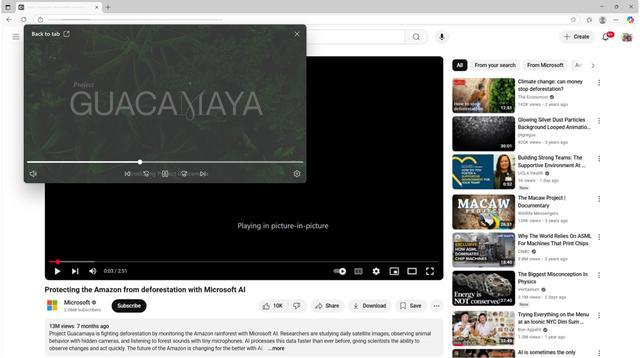
IT之家 6 月 7 日消息,当地时间周五,微软发布公告,宣布为 Edge 浏览器画中画功能推出增强版控制选项,目前已向全体用户推送。

微软表示,本次升级旨在提升多任务处理体验,使用户在工作、学习或浏览网页时更高效管理视频播放。

核心升级

IT之家注:将鼠标悬停在任何支持的视频上,然后单击画中画图标即可使其弹出到浮动窗口中,当播放器处于悬浮于画中画状态时将显示以下新控件:

播放 / 暂停

静音 / 取消静音

前进 / 后退 10 秒

进度条拖拽定位

下一集 / 上一集

设置(快捷入口)

微软表示,播放窗口支持自由调节,支持拖拽边缘调整尺寸,可任意移动窗口位置。

操作指南

在支持画中画的视频上悬停鼠标,点击出现的画中画图标

悬浮于播放窗口激活控制面板

通过拖拽实现窗口移动或尺寸调整

参考资料:

Disclaimer: Investing carries risk. This is not financial advice. The above content should not be regarded as an offer, recommendation, or solicitation on acquiring or disposing of any financial products, any associated discussions, comments, or posts by author or other users should not be considered as such either. It is solely for general information purpose only, which does not consider your own investment objectives, financial situations or needs. TTM assumes no responsibility or warranty for the accuracy and completeness of the information, investors should do their own research and may seek professional advice before investing.

Most Discussed

  1. 1


  2. 2


  3. 3


  4. 4


  5. 5


  6. 6


  7. 7


  8. 8


  9. 9


  10. 10