微软调整Win11 25H2桌面快捷方式,“目标”框不再支持添加特殊命令或参数

IT之家
Aug 06, 2025

IT之家 8 月 6 日消息,科技媒体 NeoWin 昨日(8 月 5 日)发布博文,报道称在 Dev 频道的最新 Windows 11 25H2 预览版中,微软在重新设计开始菜单之外,还调整了桌面快捷方式的工作方式。

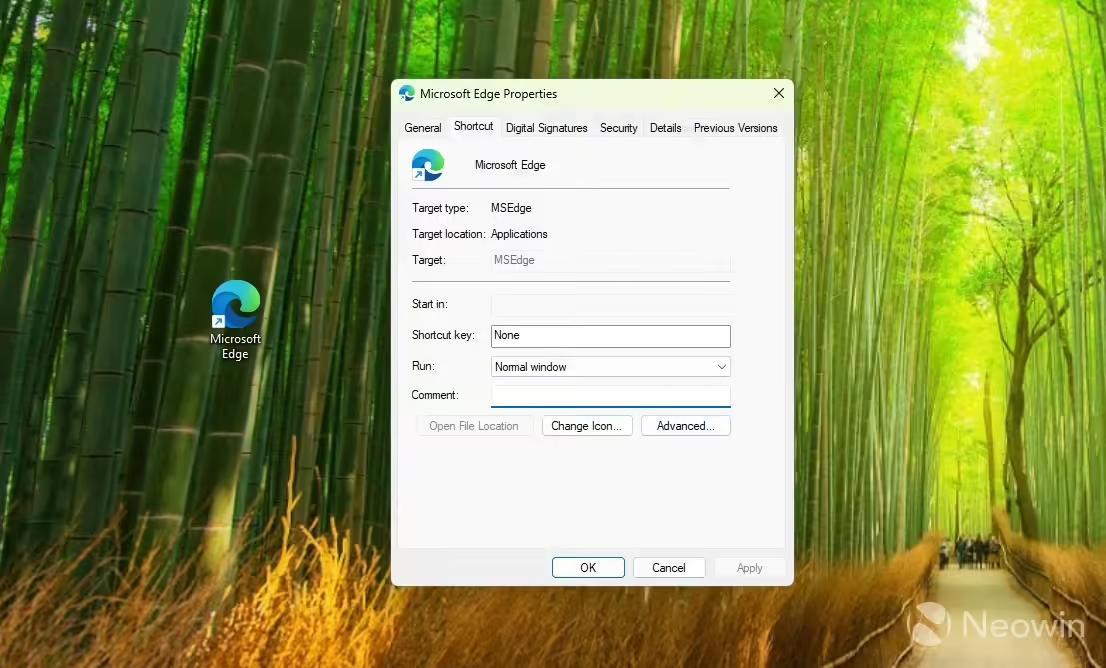
在 Windows 11 24H2 系统中,用户可以右键点击快捷方式,并在“目标”框中查看文件的路径。不过在 Windows 11 25H2 系统中,这个“目标”框中不再显示文件的完整路径。IT之家附上截图如下:

这一改变不仅增加了操作复杂度,还移除了向可执行文件添加特殊命令和参数的能力。该媒体指出,以 Edge 浏览器为例,为了强制启用某种模式,或者禁用某项功能,可以在“目标”框中添加后缀命令,但新版可能需要使用其它方式了。

Disclaimer: Investing carries risk. This is not financial advice. The above content should not be regarded as an offer, recommendation, or solicitation on acquiring or disposing of any financial products, any associated discussions, comments, or posts by author or other users should not be considered as such either. It is solely for general information purpose only, which does not consider your own investment objectives, financial situations or needs. TTM assumes no responsibility or warranty for the accuracy and completeness of the information, investors should do their own research and may seek professional advice before investing.
Most Discussed

  1. 1


  2. 2


  3. 3


  4. 4


  5. 5


  6. 6


  7. 7


  8. 8


  9. 9


  10. 10