Windows 11任务栏支持自定义位置了:桌面上下左右都能放

快科技
Yesterday

快科技3月22日消息,Windows 11任务栏不再固定死在底部,而是桌面上下左右都能放了。

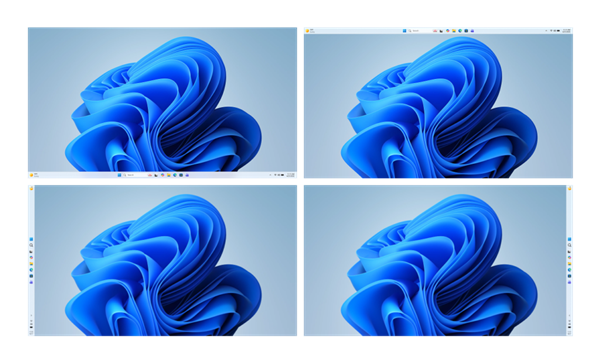
微软近日发布博客宣布,将在今年内全方位优化Windows 11系统,其中用户期待已久的任务栏自定义位置功能率先落地。该功能支持任务栏放在桌面上下左右四个方向,将于本月至四月份面向Windows预览体验成员逐步推送。

此前,任务栏仅能固定在桌面底部的限制,一直是用户主要吐槽点。此次微软回应这一核心诉求,成为系统优化中最受关注的亮点。

从官方展示来看,任务栏除保留默认底部位置外,可自由移至顶部、左侧、右侧。同时新增更小尺寸任务栏等个性化选项,贴合用户工作习惯

此外,微软同步优化了开始菜单与任务栏的整体体验,提升其可靠性和灵活性,让应用、文件访问更稳定,切换更流畅。

开始菜单的“推荐”部分也同步升级,将优先显示用户常用应用和内容,新增自定义控件,用户可调整显示内容或直接关闭该板块。

这些界面优化是微软兑现Windows 11改进承诺的重要一步。微软还承诺,将重点提升Windows 11的性能、可靠性和更新体验,包括降低内存占用、减少Copilot侵入性、优化文件资源管理器等多项实用改进,以挽回用户信任。

微软还宣布Windows 11不再强制更新。用户系统更新拥有更直接的控制权,包括可以根据需要暂停更新,以及在不强制安装更新的情况下重启或关机。

Disclaimer: Investing carries risk. This is not financial advice. The above content should not be regarded as an offer, recommendation, or solicitation on acquiring or disposing of any financial products, any associated discussions, comments, or posts by author or other users should not be considered as such either. It is solely for general information purpose only, which does not consider your own investment objectives, financial situations or needs. TTM assumes no responsibility or warranty for the accuracy and completeness of the information, investors should do their own research and may seek professional advice before investing.
Most Discussed

  1. 1


  2. 2


  3. 3


  4. 4


  5. 5


  6. 6


  7. 7


  8. 8


  9. 9


  10. 10